Give every child a voice
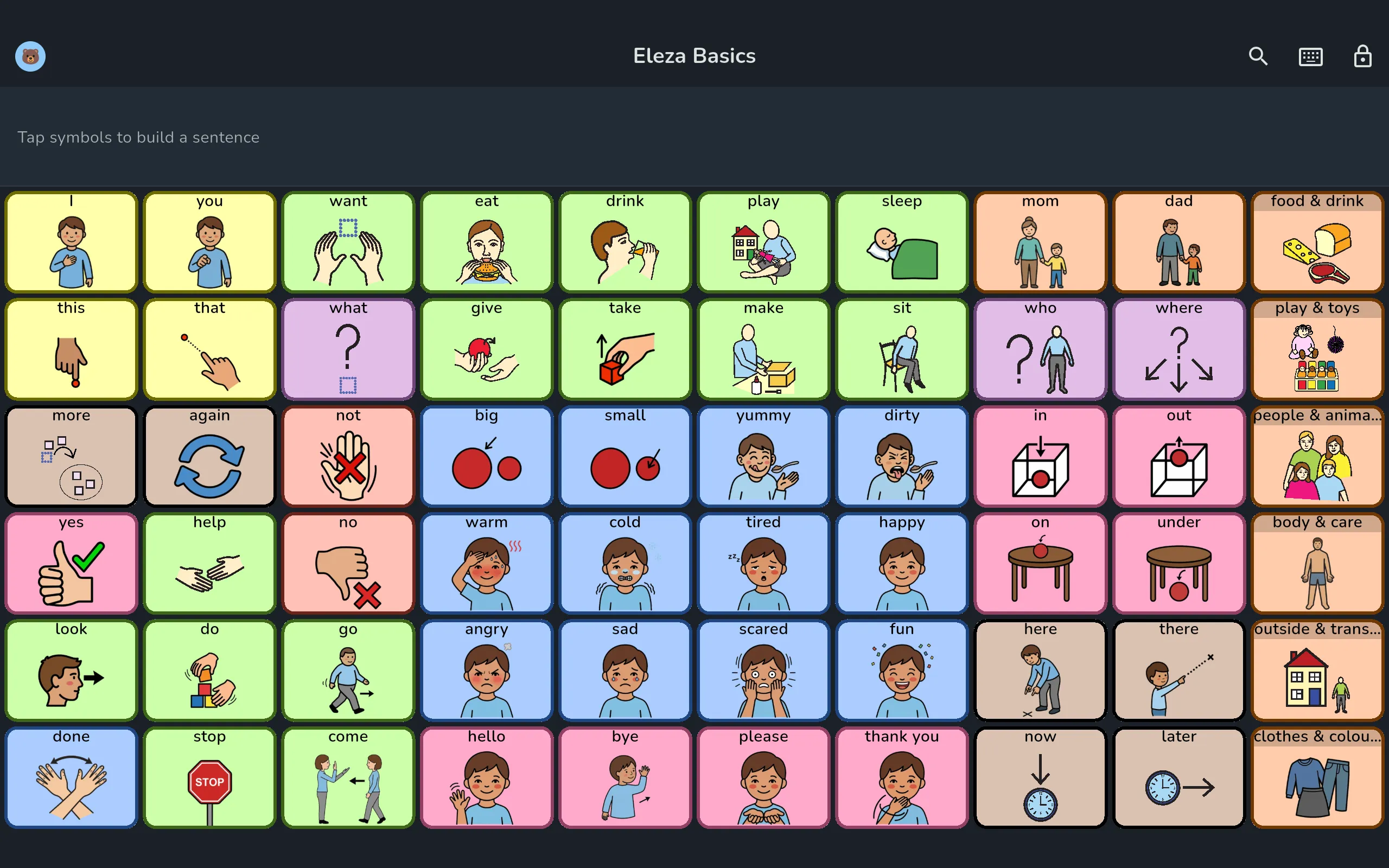
Eleza is a warm communication app (AAC) for children who can’t speak or struggle to. Tap a symbol and the app speaks. Build whole sentences word by word.
Free to use · Pro is a one-time purchase, no subscription
From a single symbol to whole sentences
It’s all about communicating: being heard and understood. This is the heart of Eleza. Nothing you make is ever taken away. Speaking is free and stays free; the tools for shaping boards are Pro, free for 14 days.
Tap to speak
A single tap on a symbol speaks the word out loud with a natural voice, with instant haptic feedback.
Build whole sentences
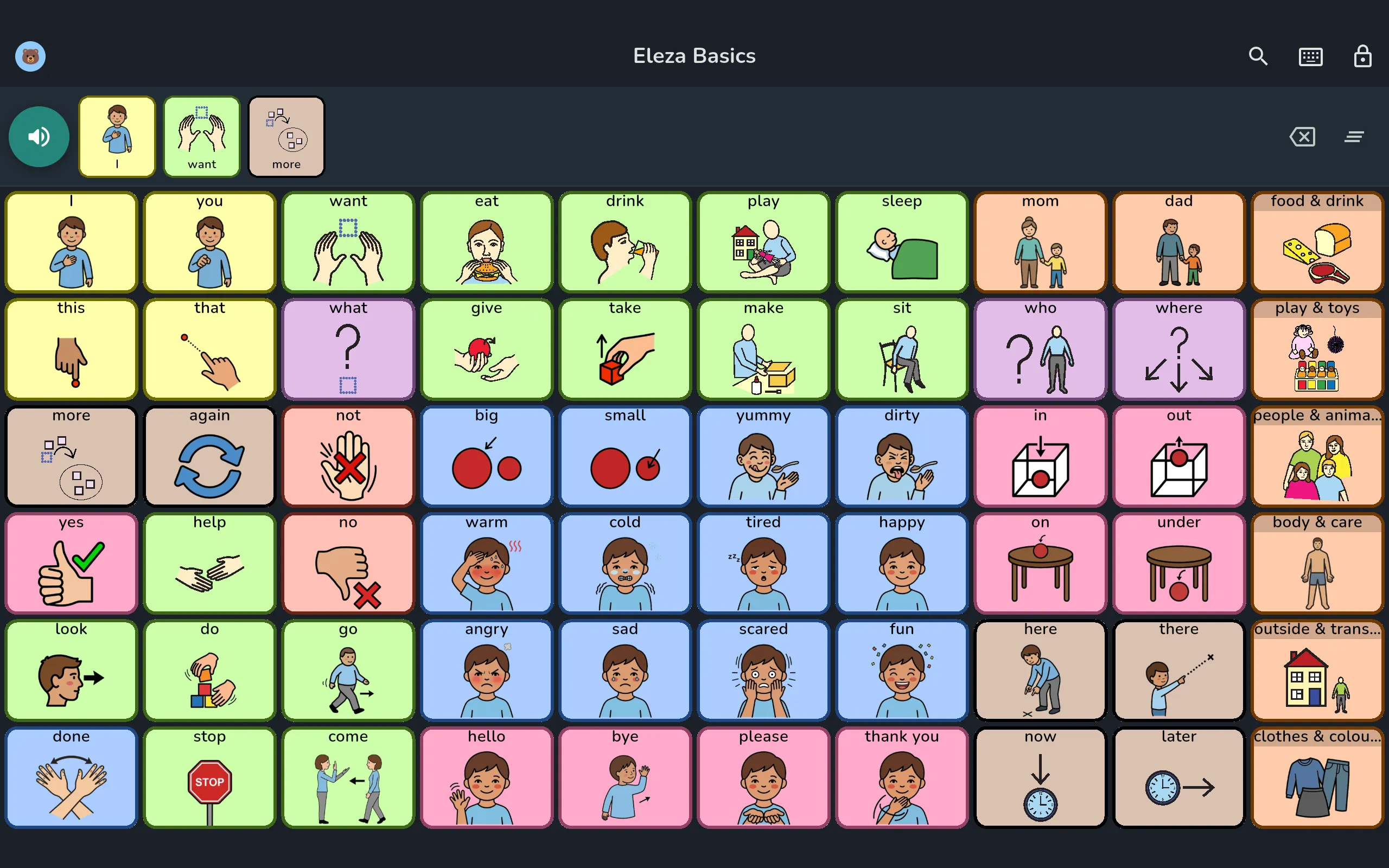
Tap several symbols in a row into the sentence bar at the top and let Eleza speak the whole phrase at once.
Shape the board to fit
With Pro you shape the board yourself: the grid, the order and the folders.
- Grids from 2×2 to 12×12
- Drag, move and remove symbols
- Folders, undo and paste between boards
Free: 25 cells you fill yourself, with symbols or your own photos.
A large, open symbol library
Thousands of symbols from several well-known sets. Type a word and find the right symbol right away.
- Eleza
- Mulberry
- Twemoji
- Noun Project
- IcoMoon
- OCHA
Speech is never paywalled
The child’s voice lives in the free version, with no time limit and no strings attached.
Words are never taken away
When a trial ends, everything you made stays and keeps speaking, your recordings included. Only the Pro tools lock again.
Buy once
Pro is a one-time purchase, not a subscription. No recurring charges, no separate account.
Research-based starter boards
Begin with a core-word board grounded in research, or build from an empty board. No blank-page stress.
Eleza Basics
60Our own board, the same core words on every page
Eleza Compact
24The same board built for a phone: bigger buttons, the same core words in the same fixed spots
Open-licence boards
24-112Quick Core by OpenAAC and Project Core, bundled under an open licence
Empty board
24-112Start blank and fill it in yourself
Eleza suggests the board that fits the screen, and you can always pick another. Rearranging it yourself later is Pro.
The same board, on a phone and on a tablet
Eleza suggests the board that fits the screen it is on. The core words sit in exactly the same place on both, so the core words stay in the same place on the board when they switch device.
Eleza Basics on a tablet
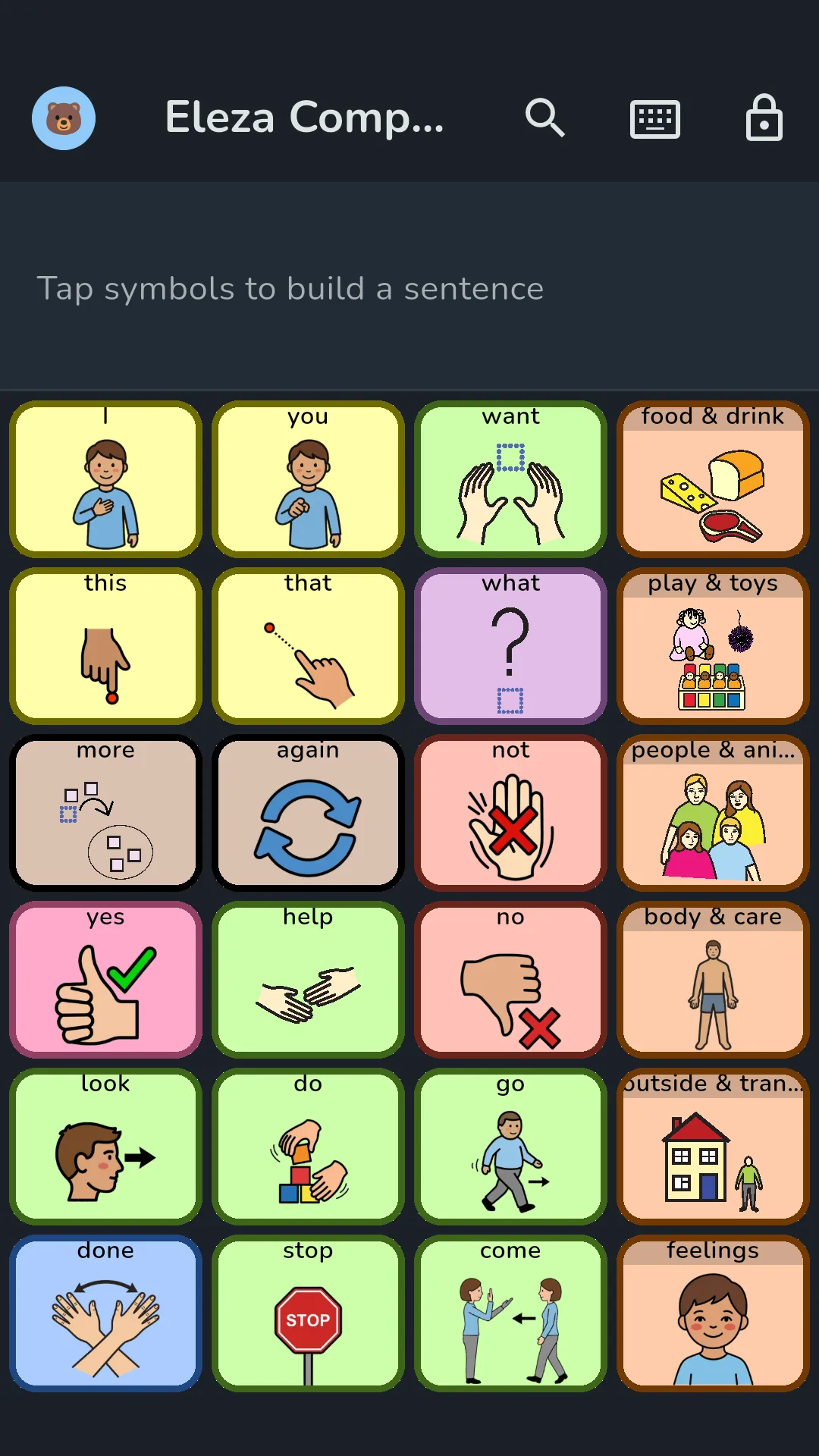
Eleza Compact on a phone
- The same 18 core words in the three leftmost columns, on every page of both boards
- A phone carries fewer words: 48 on Eleza Compact against 212 on Eleza Basics
- Every Compact word is on Basics too, so a bigger screen adds words rather than moving them
A board that grows with your child
Start small and expand when your child is ready. New words appear in their fixed spots, so nothing they already learned ever moves.
- 1
Start simple
A calm set of core words to begin with, not an overwhelming wall of symbols.
- 2
Grow in place
Raise the level step by step. New words fade in, the existing ones stay put.
- 3
Fixed positions
Positions never change, so a word your child has learned to find stays where they left it. Folders grow the same way.
- 4
Core words always in view
Turn on the core word strip and the most important words stay visible on every board, even deep inside folders.
New words appear, always in their fixed spot.
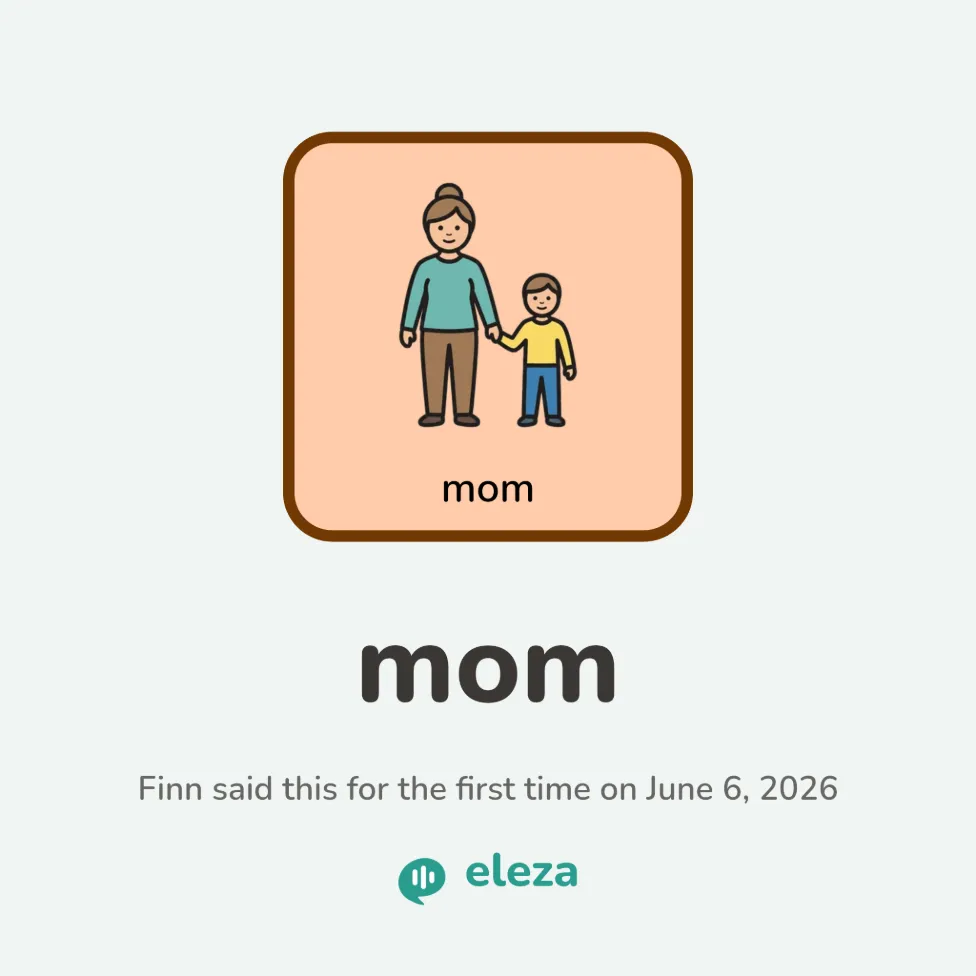
Every first word, with the date it happened
Eleza keeps a card for every word your child says for the first time. You don’t have to keep track of anything; the cards are there when you go looking.
- Dated to the first time on Eleza, not the day you noticed
- A word only counts once it comes back on another day
- First two words together and first sentence get their own cards
- Yours to share or print, free on every version
Your own photos as symbols
Turn a photo from real life into a symbol: grandpa, a favourite toy, their own cup. Something a stock library can’t match.
- Camera or gallery
- Recognisable to the child
- Instantly available on the board
- Free: 25 cells you fill yourself, symbols and photos together
Words in your own voice
Does the computer voice get a name just slightly wrong? Record the word yourself. Eleza plays your recording everywhere that word is spoken: on the board, in the sentence bar, when typing.
- Record right at the cell and trim it until it’s right
- Each child gets their own recording per word
- Playback is always free: recordings keep sounding, even after the trial
Safe in little hands
Settings and editing sit behind a 5-tap lock, so the child can’t accidentally leave or change their board.
- 5-tap lock
- No accidental changes
And plenty more
Small things that make a big difference in everyday use.
Voice tuning
Pick a voice, adjust speed and pitch, and preview before applying.
Colour coding
Colour by word type with a Fitzgerald or Goossens scheme. Colouring a single cell is Pro.
Import & export
ProOpen Board Format (.obz): back up your boards and restore them, always free. The file holds boards, not profile or voice settings. Bringing boards in from other apps is Pro. No lock-in.
Print the board
ProPrint a board or a whole set as a PDF, to practise on paper, away from the screen too.
Folders & subfolders
ProKeep vocabulary organised and clear, even on large boards.
Fixed positions
ProHide words without moving them, so the rest of the board stays exactly where your child learned it.
Typing joins the sentence
A typing bar for early readers: type a few letters and Eleza suggests words, favouring the ones already on your child’s boards. Typed words and symbols build one sentence together.
Automatic backups
Optional: the app keeps a copy of all boards in a folder you choose.
Light and dark
A calm light and dark theme that follows the device automatically.
One device, multiple children
Each child gets their own profile with an avatar, voice and boards. The symbol library is shared, ideal for families, classrooms and speech therapists.
- Its own avatar per child
- Its own voice, speed and pitch
- A separate set of boards per profile
- Switch between children in a tap
A path to every word
As vocabulary grows, the boards grow with it. The word finder searches your child’s boards and then shows the way, lighting up the route cell by cell.
Search for a word
Type a word and see right away which board it lives on.
Follow the cells
The next cell lights up each time. The child does the tapping, the app never takes over.
The route sticks
Walking the path yourself makes the word quicker to find next time.
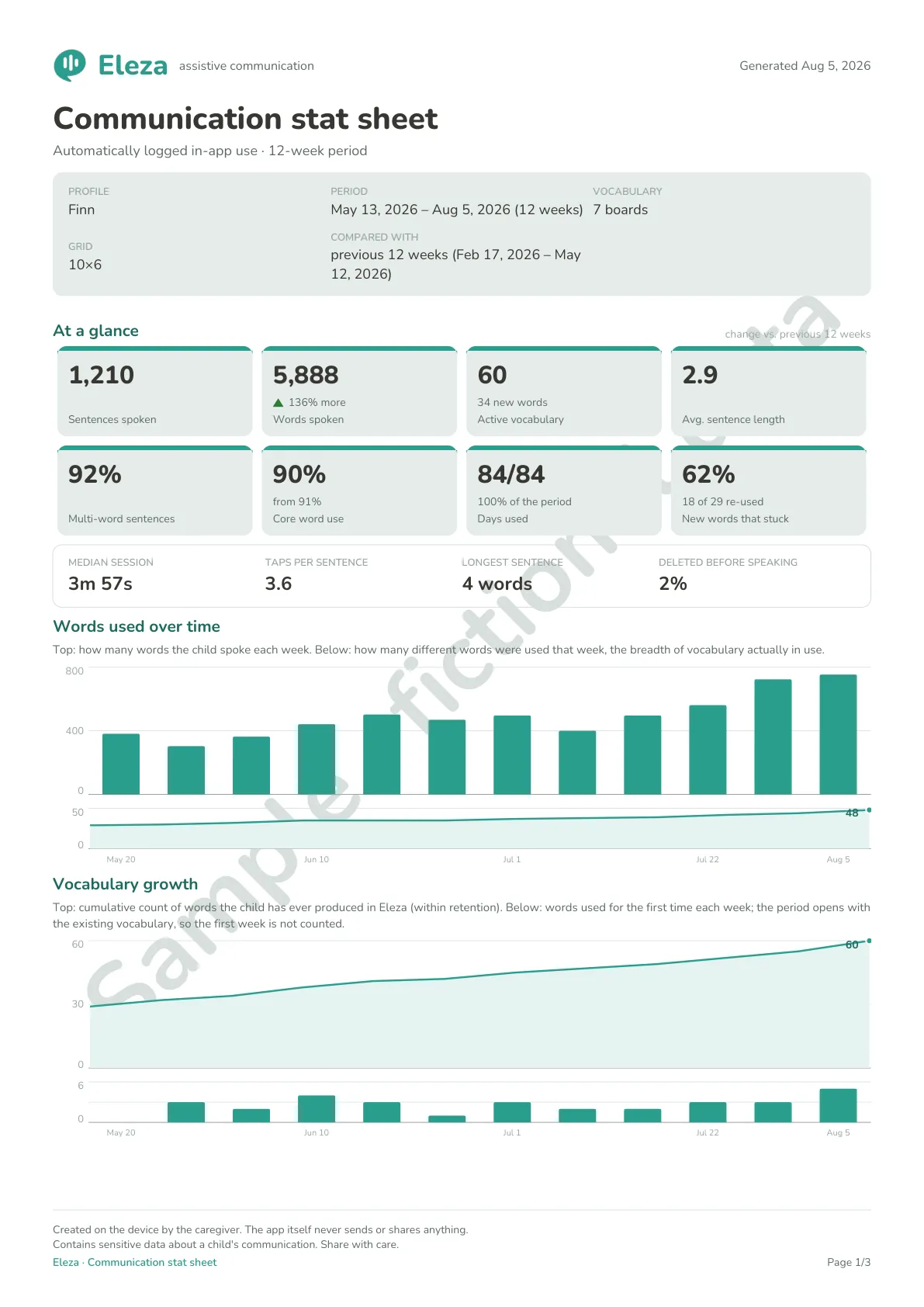
See communication grow
The Growth feature shows which words your child uses, how sentences get longer and which board words still sit unused. Everything stays on the device. Eleza only sees what happens in the app, so speech, signs and eye pointing are not counted.
Words and sentences
See how vocabulary and sentence length change over time.
Share with the therapist
A report of up to three pages to bring to the speech therapist: twelve weeks of communication, compared with the period before. Never a score for the child.
Stays yours
You turn it on per profile. Data stays on the device, expires on its own, and you can pause or erase it anytime.
Insight that never leaves the device.
View a sample report (PDF)Sample with fictional data, generated in the app.
Speaking is free, always
Everything a child needs to speak is in the free version, with no time limit. Pro adds the board-building tools and is bought once.
Free
Everything it takes to be heard.
- Tap to speak and build whole sentences
- All research-based starter boards
- Grow the board level by level
- Pick a voice, tune speed and pitch
- Fill empty cells with symbols or your own photos (up to 25)
- Make backups and restore them
- Child lock, typing bar, light and dark theme
Pro
Every tool to shape the boards yourself.
- Full board editing: drag, folders and grid sizes
- Unlimited custom cells and photos
- Multiple child profiles on one device
- The word finder with cell-by-cell guidance
- Record your own voice for words
- Import boards from other AAC apps (.obz)
- Growth insights with a report for the therapist
- Print boards to practise on paper
One-time purchase through Google Play · Try it free for 14 days first
Working in a school, practice or care group? Eleza for professionals
Privacy by design
Eleza is made for children, so privacy comes first. Everything stays on the device.
- No separate account or login
- No cloud, data stays on the device
- No tracking, ads or accounts: the app cannot send anything
- Works fully offline
Why Eleza?
Eleza means ‘to explain’ or ‘to make clear’ in Swahili.
Exactly what we want for every child: the room to explain themselves, and to be heard and understood.
Eleza is used in our own home: my sons talk with us through it.
Frequently asked questions
Who is Eleza for?
For children who can’t speak or struggle to and benefit from augmentative and alternative communication (AAC), and for their parents, teachers and speech therapists.
Does Eleza replace speech therapy?
No. Eleza is a communication aid. It does not diagnose, assess or treat anything, and it does not replace advice or therapy from a doctor or speech therapist. It also runs on one device, which can break or run out of battery, so keep another way for your child to be understood, above all for pain, distress or danger.
Can a child build whole sentences?
Yes. Tap several symbols into the sentence bar and Eleza speaks the entire phrase, not just single words.
Which devices does it run on?
Eleza is an Android app, for phones as well as tablets. The board fits the screen: Eleza Compact on a small screen, Eleza Basics on a larger one. Other platforms may follow later.
Does Eleza work with switches or eye gaze?
No. Eleza is operated by direct touch: the child taps a symbol on the screen. There is no scanning, no dwell selection and no eye-gaze support, so a child who cannot reliably touch a screen cannot use Eleza on their own. If that is your child, ask their speech therapist about an app built for switch access.
What does Eleza cost?
The heart of Eleza is free, with no time limit: speaking, building sentences, all starter boards and up to 25 custom cells. Eleza Pro adds full board editing, multiple profiles, the word finder, importing, own voice recordings, Growth insights and printing. Pro is a one-time purchase through Google Play, not a subscription, and you can try it free for 14 days first. No separate Eleza account is needed. Schools and practices use separate organisation licences, see eleza.app/professionals.
What happens when the trial ends?
Nothing disappears. All boards, profiles, custom cells and voice recordings stay in place and keep speaking. Only the Pro tools, such as full editing, lock again until you buy Pro.
Which languages are supported?
The app is available in English, Dutch and Spanish. More languages may follow later.
Can I bring existing boards along?
Yes. With Open Board Format (.obz) you can always back up your own boards and restore them, free. Importing boards from other AAC apps is part of Eleza Pro.
Can I print boards?
Yes, with Eleza Pro. Print a board or a whole set as a PDF, so you can practise on paper, away from the screen for a bit. Printing and sharing go through the device itself.
Do I need an internet connection?
No. Eleza works fully offline, without a separate account and without the cloud.
Is Eleza watching my child?
No. Eleza has no cloud and no account, and it asks for no internet permission, so Android allows it no connection at all. It keeps first words on the device by default, and the Pro feature Growth only if you turn it on. Nothing leaves unless you back it up yourself.
Try it with your child
Eleza is free to install and free to speak with. No account, no card, nothing to cancel.